<?xml version="1.0" encoding="utf-8"?><feed xmlns="http://www.w3.org/2005/Atom" ><generator uri="https://jekyllrb.com/" version="4.4.1">Jekyll</generator><link href="https://erinrwhite.com/feed/by_tag/ia.xml" rel="self" type="application/atom+xml" /><link href="https://erinrwhite.com/" rel="alternate" type="text/html" /><updated>2026-03-05T14:12:20+00:00</updated><id>https://erinrwhite.com/feed/by_tag/ia.xml</id><title type="html">Erin White</title><entry><title type="html">Interview: Practicing information architecture</title><link href="https://erinrwhite.com/ia-interview/" rel="alternate" type="text/html" title="Interview: Practicing information architecture" /><published>2023-11-02T16:00:09+00:00</published><updated>2023-11-02T16:00:09+00:00</updated><id>https://erinrwhite.com/ia-interview</id><content type="html" xml:base="https://erinrwhite.com/ia-interview/"><![CDATA[<p>This spring, I had the joy of reconnecting with my first professional colleague, manager and mentor <a href="https://www.linkedin.com/in/seteague">Susan Teague Rector</a>, who gave me some really excellent guidance during my job hunt. She’s teaching an Information Architecture class at the <a href="https://sis.utk.edu/">University of Tennessee’s iSchool</a> this fall and reached to interview me for her class. I was excited for the chance to talk about my new gig as a full-time information architect working in the civic tech space.</p>

<p><em>This is a lightly edited transcript of our interview in September 2023, shared here with her permission.</em></p>

<hr />

<p><strong>Erin joins us today to talk about what it’s like to be an information architect within an organization and how IA’s utilize organization, labeling, navigational systems in their day to day. Welcome, Erin.</strong></p>

<p>Thank you. So excited to be here.</p>

<p><strong>I know, we’re really excited to have you. Before we dive into IA, why don’t you tell us a bit about yourself and your career journey?</strong></p>

<p>Yeah, sure. Like like many folks in the tech space, it’s been kind of a winding path for me. I’ve been making websites since 1998, since I was like a teenager. Didn’t really have many friends but I did have a dial-up modem connection!</p>

<p>Eventually I found myself in a <a href="https://sils.unc.edu/">graduate program for information science</a> at the University of North Carolina at Chapel Hill. I knew that I wanted to do digital things and I was really interested in building for the web, but I wanted a theoretical match for that, to understand <em>why</em> we do what we do. I learned a lot and came out on the other side as an academic librarian.</p>

<p>And you know this, because you hired me for my first job!</p>

<p><strong>Okay. I was just thinking about that today. I think you were my first hire ever.</strong></p>

<p>Yeah! It was January of 2009. I interviewed for the job at Virginia Commonwealth University. I came in as a as a web developer, and at that time, “full stack web development” was – the word didn’t exist yet, but that’s basically what I was doing. Web design, web development, a little bit of usability and UX research and a little bit of information architecture.</p>

<p>And then I worked at VCU Libraries for 13 years. When I left I was a department head, leading digital strategy. By the time I was in that role as a department head, I wasn’t so much doing that hands on work anymore. I was leading a team, which I loved. Eventually, though, I was looking for something new. My family relocated a year ago, my wife got a new job, and I took that as an opportunity to pivot my career.</p>

<p>Over the past 15+ years, the roles in web work have specialized a lot as the field has matured. IA had always been one of, like, 20 things that I’d done as part of my job. When I was job hunting earlier this year I decided to try to go all in on information architecture as a career. There’s not a lot of roles out there; there are a lot more in corporate settings and or in large scale government settings.</p>

<p>I had been interested in entering the federal space for a while, then applied at Ad Hoc, and here we are.</p>

<p><strong>We talked a lot at my last organization about Squiggly Line careers instead of the straight path. It sounds like you’ve definitely been on that journey.</strong></p>

<p>Yeah, once I got rid of that idea that I needed to have a career path that just looked like a graph going up, that it could just sort of meander, and I didn’t necessarily have to manage people in order to advance in a career or feel like I was achieving things – I think that’s when I really was able to embrace an individual contributor role, on a team.</p>

<p>It’s different. My current role is really…it’s been a nice fit so far.</p>

<p><strong>Fantastic. What do you find in this transition to a full-time IA since you had other things in the mix – web design, web development – what’s it like to have this full time IA role?</strong></p>

<p>Well, for one thing, it feels like kind of a luxury to be able to just focus in on one practice area. With larger digital shops, you have people who are able to really be focused in on their area of expertise. You have people who are content strategists, who are UX researchers, who are developers. So to to really be able to focus in on the practice area of IA has been really great, and it’s allowed my knowledge to increase really rapidly, because I’m doing it every day instead of it being, you know, one of 20 things that I’m worried about.</p>

<p>Another thing I’ve noticed is, there’s a permeable membrane between information architecture and more strategic work on these projects. I’ve started to work on issues at my job that are not just specific to web interfaces or digital products, but that are more 30,000-foot messy information problems. For example, if we are trying to get a handle on a set of concepts, or how to categorize or group clusters of objects, ideas, etc.</p>

<p>It’s been cool to be able to focus on the website, but also to know that there are thorny info problems that really need that IA brain to be able to to conceptualize, put words on things, and be able to move the conversation. It’s about creating that generative space where you get people together talking about something and you’re asking the questions to move the conversation. IAs do that a lot and it’s a skill that really translates.</p>

<p><strong>Yeah, definitely. When you think about, you know, the traditional things that we learn in IA: organizational systems, labeling systems, navigational systems – how does that appear in some of the day-to-day work that you do?</strong></p>

<p>I think about this a lot in day-to-day work. I’m working on a huge federal project and my team specifically is a governance team. So we work with all the other teams that are working on this digital ecosystem to make sure that what they create is consistent based on standards, and that it’s going to be a unified experience for our users.</p>

<p>I’m not necessarily creating site maps or generating user flows, but what I <em>am</em> doing is working with others to give them guidance and review their work, and make sure that we’re all solving good problems.</p>

<p>We talk about organization a lot. One of the cool things about about this project is that we do a <em>lot</em> of user research. We talk to a lot of people and really try to use that research to understand people’s mental models of what they’re doing, understand how they think, how they group items together in their brains so that we can try to match what we’re building to those conceptual models. Everybody’s got a different brain, but you can observe themes and trends and make some decisions based on that.</p>

<p>On the flip side, we’re working often with legacy systems and designs. This isn’t the first time we’re building, a page about a service. There was a page or entire website about that service that was developed 20 years ago. And at the time, the way that we made websites was different. We didn’t have an emphasis on user research. We were building websites that matched our organizational structures.</p>

<p>That’s <a href="https://en.wikipedia.org/wiki/Conway%27s_law">Conway’s Law</a>, where the software you build matches your org structure pretty much one to one.</p>

<p><strong>Yeah, Conway wrote that in the sixties and we’re still seeing it in a lot of sites.</strong></p>

<p>Yeah, I saw it when I started at VCU! I was joining you in your work and you were like, oh my god, this website is the library org chart, and we need to undo that.</p>

<p><strong>Yep, exactly.</strong></p>

<p>So there’s a lot of legacy work untangling that and reorganizing to better match how people might actually use the site and understand things.</p>

<p><strong>That’s really awesome to hear about the user research. Within this class, we’ve had a lot of emphasis on user research. One group has done a card sort, and they’ve also interviewed each other to try to dig in to how people think about labeling, and really making sense of any mess, to quote <a href="https://abbycovert.com/">Abby the IA</a>. You know, it doesn’t matter whether you’re in a meeting or not; IA is really integral to being able to connect those dots, but also simplify language.</strong></p>

<p>Yeah, absolutely. And I feel like a lot of times the IA is also the person who will be saying, “Okay, I’ve got the 30,000 foot view of the ecosystem. Let’s talk about how how all of it ties together, and how folks might understand the whole picture of what they’re working with.”</p>

<p>UX folks are also going to be asking those questions. There’s a really strong kinship between IA and UX, and also with accessibility. There’s been a huge emphasis on accessibility with my team, which has been great because we’ve been forefronting the needs of folks with disabilities. Not just talking about folks who use screen readers, but folks with mobility issues, with cognitive impairments. Folks who are experiencing the digital product in ways that maybe people who are abled, are not.</p>

<p>So that’s one that’s been one of the really cool things, just seeing how everything sort of threads together.</p>

<p><strong>Absolutely. A few people in this course have pointed out different ways – they watched a video from the 90s from Dan Brown from IDEO, and there were a few things in there that weren’t really thinking about how people with disabilities might use certain things.</strong></p>

<p>Yeah, and there are good articles on <a href="https://alistapart.com/">A List Apart</a> as well about accessibility in general, but especially <a href="https://alistapart.com/article/designing-for-cognitive-differences/">designing for cognitive differences</a>.</p>

<p>One thing I’ve been thinking about a lot, especially since COVID, is that folks are dealing with either situational or long term cognitive impacts of COVID. More and more we’re seeing folks who need more considerate design, who need captions along with their videos – not necessarily because they can’t hear the audio, but because they need to be able to <em>read</em> <em>and hea</em>r to understand.</p>

<p>So it’s, it’s just been really eye opening, especially in the past few years, how much that accessibility emphasis is coming to the fore. We’re talking about it and we’re making moves in that direction.</p>

<p>But the more time you spend on a product, the more you see that needs to be improved.</p>

<p>It’s UX vs UI. It can be beautiful, but it can be completely unusable.</p>

<p><strong>Exactly. Switching gears just a little bit, how have you designed for search? Especially given your library background, I would imagine that would be a huge part of that, but maybe in your current role as well.</strong></p>

<p>We think about search a lot.</p>

<p>The big search on the brain, of course, is our favorite consumer search engines: Google, Bing, Duck Duck Go, the big ones. We assume that most of our traffic is coming in from search rather than someone saying, “Let me just type in the web address and click through and find the page.” None of us behave like that anymore. Search is often the default.</p>

<p>So, that encourages us to create digital products that are going to be optimized for search.</p>

<p>The good news is that if you structure your content and your site well for humans, it’ll also be structured well for robots! When you create pages that are accessible and that follow standards, best practices for web creation, that boosts your search engine optimization.</p>

<p>Some of this may be kind of basic information, but things like,</p>

<ul>
  <li>Do you use headings to convey the structure of the information?</li>
  <li>Is there a single level-one heading that is the title of the page?</li>
  <li>Does the page title that shows up in the browser tab, the title tag, does that clearly reflect what the page is?</li>
  <li>Is there text on the page that describes, “here’s what this page is about”?</li>
  <li>Are you using plain language?</li>
  <li>Are you using clear link text? Instead of links like “click here” or “learn more”, the link describes the its destination.</li>
  <li>Are you <strong>not</strong> stuffing your page with keywords, because most larger search engines disregard that, and they actually often weigh against keyword stuffing.</li>
</ul>

<p>There are other things that can be done in your content management system too, like smart title tags, adding things to the meta description for the page. If you’re using WordPress or something, use an SEO plugin and make sure that you’re structuring things well. Use some of those common navigational elements like breadcrumbs in your theme that’ll show search engines how a site is structured, alongside your site navigation.</p>

<p>So that’s the things that we keep in mind for big search.</p>

<p><strong>Many folks in the class are professional writers, and the things that you brought up about the structure of the page are so important. In an IA class, everyone’s thinking about navigation, but there’s all these other structural elements that you brought up that are really important.</strong></p>

<p>Yeah! The navigability within the page, being able to place make and understand, “What am I looking at?”</p>

<p>Nobody’s reading every single word on a page. I don’t do it. You don’t do it. Nobody reads every single word on the page. So we gotta design for scannability, and use words that aren’t, you know, $12 words.</p>

<p>There’s some really good guidance from <a href="https://www.plainlanguage.gov/">PlainLanguage.gov</a> about how to write for the web and how to clearly structure things for folks. It not only helps search engines, but it helps your users to access the information quickly.</p>

<p><em>And,</em> it’s an accessibility thing. It helps folks who maybe have brain fog, or folks who just need something simple and not something clever.</p>

<p><strong>Right! Well, we’re almost at time, but I have a couple last questions for you. You mentioned that IA jobs are, not as abundant as other types of roles. What do you see in some of the challenges and the opportunities for the future?</strong></p>

<p>There’s a ton of opportunities. The joining of the IA and the user experience spheres is very strong. We’ve got a lot of the same concerns. “How are people using our stuff? How can we make it better? Is the interface actually doing what we want it to do?”</p>

<p>One thing I’ve observed, and have been thinking about a lot, is how the web is transforming from this page-based model that we had. Especially in the late nineties, it was like, “Oh, it’s a website. It’s like a book. We have web pages. Sign my guest book.” We used that book mental model to think about the web.</p>

<p>Now, that’s kind of blown up; it’s no longer a thing. We’re having interactions that are nonlinear. We’re having chatbot interactions. Which, chatbots are a whole information architecture tangle. We’ve got people using mobile apps and mobile websites. We’ve got people interacting with different devices in different ways, across entire ecosystems with organizations.</p>

<p>And then we’ve also got third party websites that have information about us. So, you know, Google has information about us. But also we might have a page on Facebook or some other site where we have claimed a page.</p>

<p>So being able to tie that all together in a meaningful way, and to have consistent correct information, is the challenge.</p>

<p>One other thing that I’ll say: I’ve learned recently about <a href="https://www.ooux.com/">Object Oriented UX</a>, which is similar to information architecture in that it steps back from the interface part of the UX and is asking, “What are people’s mental models? What kind of objects to people envision in their brains in this space?”</p>

<p>That object oriented UX approach allows you to then operationalize within an interface, but it’s much more abstracted, and that’s where I really think IA is headed.</p>

<p><strong>This has been amazing. I think everyone is gonna learn so much from you in this session. Is there anything else you wanted to add before we sign off?</strong></p>

<p>I’m glad you said that. I would say, consider government service. There’s a ton of good work to be done, there’s a lot more attention to it recently, and there’s some <a href="https://federalnewsnetwork.com/reporters-notebook-jason-miller/2023/08/for-21st-century-idea-act-eis-its-just-a-matter-of-time/">legislation coming through about technology modernization</a> that will increase the amount of funding. So there are ways to get in, especially if you’re in UX writing and content strategy.</p>

<p>With government work, you’re not necessarily worried about selling something. You’re worried about, are people getting what they need?</p>

<p>It’s mission-driven work and can be really satisfying. So, a little plug for public service.</p>

<p><strong>Gov tech is taking off. I’ve noticed it too, and many of the things that we’ve looked at in class, examples for personas, we’ve pulled from <a href="https://design-system.service.gov.uk/">Gov.UK</a>. We’ve also pulled some examples from the <a href="https://www.usda.gov/about-usda/general-information/staff-offices/departmental-administration/office-customer-experience-ocx">USDA</a>, which has an amazing customer experience site. So I think that definitely is helping to amp up government sector.</strong></p>

<p>Yes! Gov.UK is excellent. They’re really leading the charge on a lot of civic tech and design things. Good work being done.</p>

<p><strong>Thank you so much. We really appreciate it and I think this is going to be just amazing for the students.</strong></p>

<p>Thanks so much for asking me.</p>]]></content><author><name>erinrwhite</name></author><category term="civic-tech" /><category term="libraries" /><category term="tech" /><category term="ia" /><category term="a11y" /><summary type="html"><![CDATA[This spring, I had the joy of reconnecting with my first professional colleague, manager and mentor Susan Teague Rector, who gave me some really excellent guidance during my job hunt. She’s teaching an Information Architecture class at the University of Tennessee’s iSchool this fall and reached to interview me for her class. I was excited for the chance to talk about my new gig as a full-time information architect working in the civic tech space.]]></summary></entry><entry><title type="html">Trans-inclusive design at A List Apart</title><link href="https://erinrwhite.com/trans-inclusive-design-at-a-list-apart/" rel="alternate" type="text/html" title="Trans-inclusive design at A List Apart" /><published>2019-05-09T12:48:34+00:00</published><updated>2019-05-09T12:48:34+00:00</updated><id>https://erinrwhite.com/trans-inclusive-design-at-a-list-apart</id><content type="html" xml:base="https://erinrwhite.com/trans-inclusive-design-at-a-list-apart/"><![CDATA[<p>I am thrilled and terrified to say that I have an article on <a href="https://alistapart.com/article/trans-inclusive-design/">Trans-inclusive design</a> out on A List Apart today.</p>

<p>I have read A List Apart for years and have always seen it as The Site for folks who make websites, so it is an honor to be published there.</p>]]></content><author><name>erinrwhite</name></author><category term="libraries" /><category term="tech" /><category term="ux" /><category term="ia" /><category term="trans" /><summary type="html"><![CDATA[I am thrilled and terrified to say that I have an article on Trans-inclusive design out on A List Apart today.]]></summary></entry><entry><title type="html">Back-to-school mobile snapshot</title><link href="https://erinrwhite.com/back-to-school-mobile-snapshot/" rel="alternate" type="text/html" title="Back-to-school mobile snapshot" /><published>2015-09-04T19:40:25+00:00</published><updated>2015-09-04T19:40:25+00:00</updated><id>https://erinrwhite.com/back-to-school-mobile-snapshot</id><content type="html" xml:base="https://erinrwhite.com/back-to-school-mobile-snapshot/"><![CDATA[<p>This week I took a look at mobile phone usage on the VCU Libraries website for the first couple weeks of class and compared that to similar time periods from the past couple years.</p>

<h2 id="2015">2015</h2>

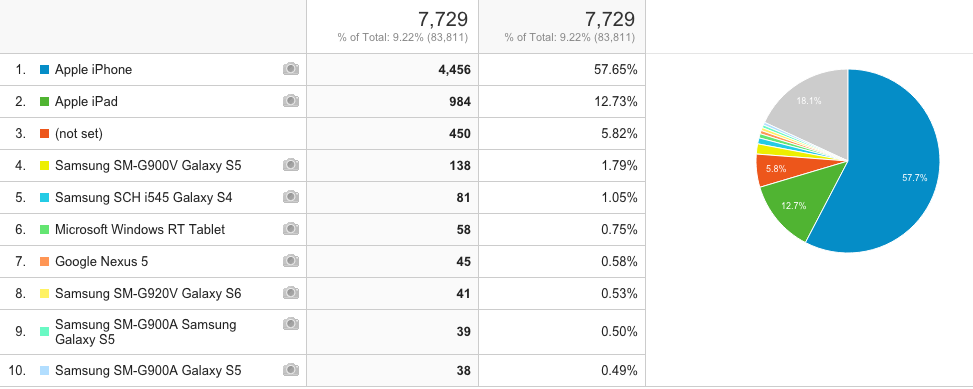
<p>Here’s some data from the first week of class through today.</p>

<p>Note that <strong>mobile is 9.2% of web traffic</strong>. To round some numbers, 58% of those devices are iPhones/iPods and 13% are iPads. So we’re looking at about 71% of mobile traffic (about 6.5% of <em>all</em> web traffic) from Apple devices. Dang. After that, it’s a bit of a long tail of other device types.</p>

<p>To give context, about 7.2% of our overall traffic came from the Firefox browser. So we have more mobile users than Firefox users.</p>

<p><a href="/assets//2013-2024//2015/09/2015-devices.png"><img src="/assets//2013-2024//2015/09/2015-devices.png" alt="2015 mobile device breakdown" /></a></p>

<h2 id="2014">2014</h2>

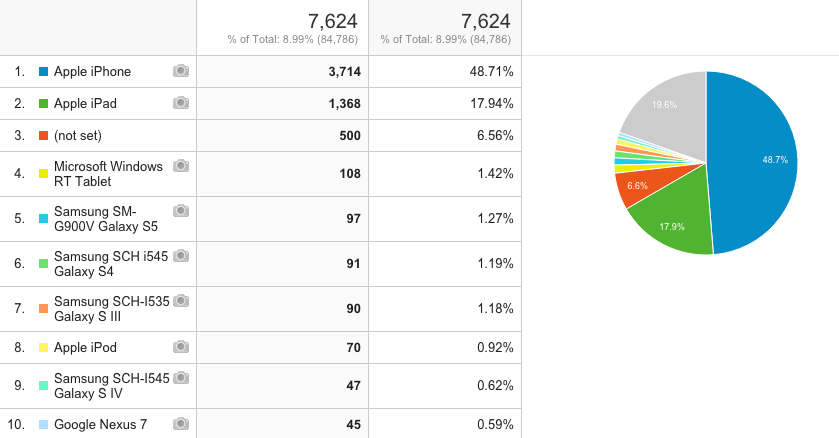
<p>Mobile jumped to 9% of all traffic this year. This is partially due to our retiring our mobile-only website in lieu of a responsive web design. As with the other years, at least 2/3 of the mobile traffic is an iOS device.</p>

<p><a href="/assets//2013-2024//2015/09/2014-devices.png"><img src="/assets//2013-2024//2015/09/2014-devices.png" alt="2014 mobile device breakdown" /></a></p>

<h2 id="2013">2013</h2>

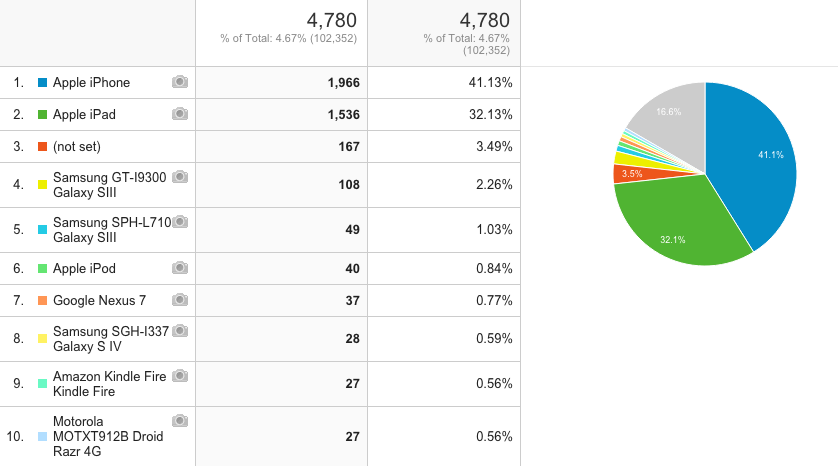
<p>Mobile was 4.7% of all traffic; iOS was 74% of all traffic; tablets, amazingly, were 32% of all mobile traffic.</p>

<p>I have one explanation for the relatively low traffic from iPhone: at the time, we had a separate mobile website that was catching a lot of traffic for handheld devices. Most phone users were being automatically redirected there.</p>

<p><a href="/assets//2013-2024//2015/09/2013-devices.png"><img src="/assets//2013-2024//2015/09/2013-devices.png" alt="2013 mobile device breakdown" /></a></p>

<h2 id="observations">Observations</h2>

<h3 id="browser-support">Browser support</h3>

<p>Nobody’s surprised that people are using their phones to access our sites. When we launched the new VCU Libraries website last January, the web team built it with a <a href="https://en.wikipedia.org/wiki/Responsive_web_design">responsive web design</a> that could accommodate browsers of many shapes and sizes. At the same time, we decided which desktop browsers to leave behind – like Internet Explorer 8 and below, which we also stopped fully supporting when we launched the site. Looking at stats like this helps us figure out which devices to prioritize/test most with our design.</p>

<h3 id="types-of-devices">Types of devices</h3>

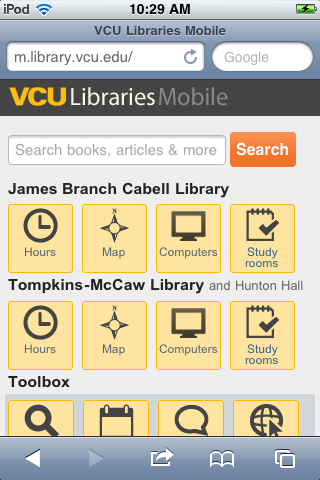
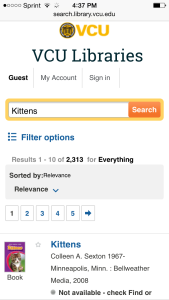
<p><a href="/assets//2013-2024//2015/09/1-mobile-homepage.png"><img src="/assets//2013-2024//2015/09/1-mobile-homepage.png" alt="VCU Libraries mobile circa 2011" /></a>Though it’s impossible to test on every device, we have targeted most of our mobile development on iOS devices, which seems to be a direction we should keep going as it catches a majority of our mobile users. It would also be useful for us to look at larger-screen Android devices, though (any takers?). With virtual testing platforms like <a href="http://www.browserstack.com">BrowserStack</a> at our disposal we can test on many types of devices. But we should also look at ways to test with real devices and real people.</p>
<h3 id="content">Content</h3>

<p>Thinking broadly about strategy, making special mobile websites/m-dots doesn’t make sense anymore. People want full functionality of the web, not an oversimplified version with only so-called “on-the-go” information. Five years ago when we debuted our mobile site, this might’ve been the case. Now people are doing everything with their phones–including writing short papers, according to our personas research a couple years ago. So we should keep pushing to make everything usable no matter the screen.</p>]]></content><author><name>erinrwhite</name></author><category term="libraries" /><category term="ux" /><category term="ia" /><summary type="html"><![CDATA[This week I took a look at mobile phone usage on the VCU Libraries website for the first couple weeks of class and compared that to similar time periods from the past couple years.]]></summary></entry><entry><title type="html">Easier access for databases and research guides at VCU Libraries</title><link href="https://erinrwhite.com/easier-access-for-databases-and-research-guides-at-vcu-libraries/" rel="alternate" type="text/html" title="Easier access for databases and research guides at VCU Libraries" /><published>2015-01-07T15:00:10+00:00</published><updated>2015-01-07T15:00:10+00:00</updated><id>https://erinrwhite.com/easier-access-for-databases-and-research-guides-at-vcu-libraries</id><content type="html" xml:base="https://erinrwhite.com/easier-access-for-databases-and-research-guides-at-vcu-libraries/"><![CDATA[<p>Today VCU Libraries launched a couple of new web tools that should make it easier for people to find or discover our library’s databases and research guides.</p>

<p>This project’s goal was to help connect “hunters” to known databases and help “gatherers” explore new topic areas in databases and research guides<sup><a href="#footnote1">1</a></sup>. Our web redesign task force identified these issues in 2012 user research.</p>

<h2 id="1-new-look-for-the-databases-list">1. New look for the databases list</h2>

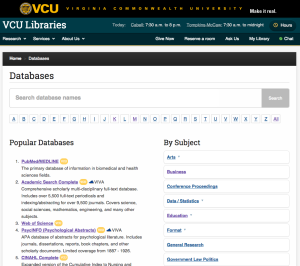
<p>Since the dawn of library-web time, visitors to our <a href="https://apps.library.vcu.edu/dblist/">databases landing page</a> were presented with an A to Z list of hundreds of databases with a list of subject categories tucked away in the sidebar.</p>

<p><a href="https://apps.library.vcu.edu/dblist/"><img src="/assets//2013-2024//2015/01/Screen-Shot-2015-01-06-at-4.07.58-PM-300x266.png" alt="new db list" /></a>The new design for the databases list presents a few ways to get at databases, in this order:</p>

<p><strong>For the hunters:</strong></p>

<ul>
  <li>Search by title with autocomplete (new functionality)</li>
  <li>A to Z links</li>
</ul>

<p><strong>For the gatherers:</strong></p>

<ul>
  <li>Popular databases (new functionality)</li>
  <li>Databases by subject</li>
</ul>

<p>And, on <a href="https://apps.library.vcu.edu/dblist/category/77">database subject pages</a> and <a href="https://apps.library.vcu.edu/dblist/search?q=medicine">database search results</a>, there are links to related research guides.</p>

<h2 id="2-suggested-results-for-search">2. Suggested results for search</h2>

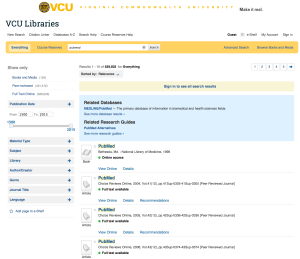
<p>Building on the search feature in the new database list, we created an AJAX Google Adwords-esque add-on to our search engine (Ex Libris’ Primo) that recommends databases or research guides results based on the search query. For longer, more complex queries, no suggestions are shown.</p>

<p><img src="/assets//2013-2024//2015/01/Screen-Shot-2015-01-06-at-4.19.18-PM-300x259.png" alt="suggested results" />Try these queries:</p>

<ul>
  <li><a href="http://search.library.vcu.edu/primo_library/libweb/action/dlSearch.do?institution=VCU&amp;vid=VCU&amp;search_scope=all_scope&amp;dym=true&amp;query=any,contains,cinahl">cinahl</a></li>
  <li><a href="http://search.library.vcu.edu/primo_library/libweb/action/dlSearch.do?institution=VCU&amp;vid=VCU&amp;search_scope=all_scope&amp;dym=true&amp;query=any,contains,dissertations">dissertations</a></li>
  <li><a href="http://search.library.vcu.edu/primo_library/libweb/action/dlSearch.do?institution=VCU&amp;vid=VCU&amp;search_scope=all_scope&amp;dym=true&amp;query=any,contains,psycinfo">psycinfo</a></li>
  <li><a href="http://search.library.vcu.edu/primo_library/libweb/action/dlSearch.do?institution=VCU&amp;vid=VCU&amp;search_scope=all_scope&amp;dym=true&amp;query=any,contains,art+history">art history</a></li>
  <li><a href="http://search.library.vcu.edu/primo_library/libweb/action/dlSearch.do?institution=VCU&amp;vid=VCU&amp;search_scope=all_scope&amp;dym=true&amp;query=any,contains,surgery">surgery</a></li>
  <li><a href="http://search.library.vcu.edu/primo_library/libweb/action/dlSearch.do?institution=VCU&amp;vid=VCU&amp;search_scope=all_scope&amp;dym=true&amp;query=any,contains,video+games+violence">video games violence</a> (no matches)</li>
</ul>

<p>Included in the suggested results:</p>

<ul>
  <li><a href="https://apps.library.vcu.edu/dblist/">Database</a> titles and descriptions, which are being indexed in the VCU Libraries search engine</li>
  <li><a href="http://guides.library.vcu.edu/">Subject guide</a> and <a href="http://guides.library.vcu.edu/home/howdoi">How do I… guide</a> titles using the LibGuides 1.0 API</li>
</ul>

<h2 id="3-updates-to-link-pathways-for-databases">3. Updates to link pathways for databases</h2>

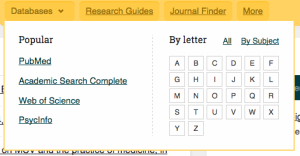
<p>To highlight the changes to the databases page, we also made some changes to how we are linking to it. Previously, our homepage search box linked to popular databases, the alphabet characters A through Z, our subject list, and “all”.</p>

<p><img src="/assets//2013-2024//2015/01/Screen-Shot-2015-01-06-at-12.51.22-PM-300x156.png" alt="old A-Z links" /></p>

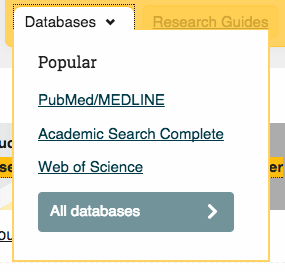
<p>The intent of the new design is to surface the new databases list landing page and wean users off the A-Z interaction pattern in lieu of search.</p>

<p><img src="/assets//2013-2024//2015/01/Screen-Shot-2015-01-06-at-12.50.20-PM.png" alt="Screen Shot 2015-01-06 at 12.50.20 PM" /></p>

<p>The top three databases are still on the list both for easy access and to provide “information scent” to clue beginner researchers in on what a database might be.</p>

<p>Dropping the A-Z links will require advanced researchers to make a change in their interaction patterns, but it could also mean that they’re able to get to their favorite databases more easily (and possibly unearth new databases they didn’t know about).</p>

<h2 id="remaining-questionsissues">Remaining questions/issues</h2>

<ul>
  <li>Research guides search is just okay. The results are helpful a majority of the time and wildly nonsensical the rest of the time. And, this search is slowing down the overall load time for suggested results. The jury is still out on whether we’ll keep this search around.</li>
  <li>Our database subject categories need work, and we need to figure out how research guides and database categories should relate to each other. They don’t connect right now.</li>
  <li>We don’t know if people will actually <em>use</em> the suggested search results and are not sure how to define success. We are tracking the number of clicks on these links using Google Analytics event tracking – but what’s good? How do we know to keep this system around?</li>
  <li>The change away from the A-Z link list will be disruptive for many and was not universally popular among our librarians. Ultimately it should be faster for “hunters”, but we will likely hear groans.</li>
  <li>The database title search doesn’t yet account for common and understandable misspellings<sup><a href="#footnote2">2</a></sup> of database names, which we hope to rectify in the future with alternate titles in the metadata.</li>
</ul>

<h2 id="necessary-credits">Necessary credits</h2>

<p><strong>Shariq Torres</strong>, our web engineer, provided the programming brawn behind this project, completely rearchitecting the database list in Slim/Ember and writing an AJAX frontend for the suggested results. Shariq worked with systems librarians <strong>Emily Owens</strong> and <strong>Tom McNulty</strong> to get a Dublin Core XML file of the databases indexed and searchable in Primo. Web designer <strong>Alison Tinker</strong> consulted on look and feel and responsified the design for smaller-screen devices. A slew of <strong>VCU librarians</strong> provided valuable feedback and QA testing.</p>

<hr />

<ol>
  <li>I believe this hunter-gatherer analogy for information-seeking behaviors came from Sandstrom’s <a href="http://www.jstor.org/stable/4308969">An Optimal Foraging Approach to Information Seeking and Use</a> (1994) and have heard it in multiple forms from smart librarians over the years.</li>
  <li>Great info from Ken Varnum’s <a href="http://www.lib.umich.edu/blogs/library-tech-talk/database-names-are-hard-learn">Database Names are Hard to Learn</a> (2014)</li>
</ol>]]></content><author><name>erinrwhite</name></author><category term="libraries" /><category term="ux" /><category term="ia" /><summary type="html"><![CDATA[Today VCU Libraries launched a couple of new web tools that should make it easier for people to find or discover our library’s databases and research guides.]]></summary></entry><entry><title type="html">A new look for search at VCU Libraries</title><link href="https://erinrwhite.com/a-new-look-for-search-at-vcu-libraries/" rel="alternate" type="text/html" title="A new look for search at VCU Libraries" /><published>2014-08-01T13:00:49+00:00</published><updated>2014-08-01T13:00:49+00:00</updated><id>https://erinrwhite.com/a-new-look-for-search-at-vcu-libraries</id><content type="html" xml:base="https://erinrwhite.com/a-new-look-for-search-at-vcu-libraries/"><![CDATA[<p>This week we launched a new design for <a href="http://search.library.vcu.edu/">VCU Libraries Search</a> (our instance of <a href="http://www.exlibrisgroup.com/category/PrimoOverview">Ex Libris’ Primo</a> discovery system). The guiding design principles behind this project:</p>

<ol>
  <li><a href="https://developer.apple.com/library/mac/documentation/userexperience/conceptual/applehiguidelines/HIPrinciples/HIPrinciples.html#//apple_ref/doc/uid/TP30000353-CJBDDFAJ">Mental models</a>: Bring elements of the search interface in line with other modern, non-library search systems that our users are used to. In our case, we looked to e-commerce websites as a model for some search design patterns. The context is not a perfect 1:1 match, but the comparisons proved useful.</li>
  <li><a href="http://www.usabilityfirst.com/glossary/aesthetic-integrity/">Aesthetic Integrity</a>: make the visual design more coherent, consistent, and attractive.</li>
  <li><a href="http://en.wikipedia.org/wiki/Progressive_disclosure">Progressive disclosure</a>: make the system more approachable for novice users by simplifying the interface, while keeping options for advanced users available on demand. The <a href="https://developer.apple.com/library/mac/documentation/userexperience/conceptual/applehiguidelines/UEGuidelines/UEGuidelines.html">Apple Human Interface Guidelines</a> explain this concept well.</li>
</ol>

<h2 id="before-and-after">Before and after</h2>

<p><a href="/assets//2013-2024//2014/07/old-search1.jpeg"><img src="/assets//2013-2024//2014/07/old-search1-300x188.jpeg" alt="old-search" /></a> <a href="/assets//2013-2024//2014/07/new-search.png"><img src="/assets//2013-2024//2014/07/new-search-300x185.png" alt="new-search" /></a></p>

<p>Following our guiding principles, we:</p>

<ul>
  <li>Hid many elements, most of them text elements.</li>
  <li>Added expand/collapse functionality to the left-hand facet list, with the exception of the date facet, which remained open.</li>
  <li>Incorporated <a href="https://github.com/ndlib/primo-date-slider">Notre Dame’s improvements to the date slider</a>.</li>
  <li>Gave the facet lists and the search result items more visual breathing room.</li>
  <li>Standardized fonts and text sizes.</li>
  <li>Added VCU branding and colors and incorporated fonts and design themes from the main VCU Libraries website.</li>
  <li>Made the pagination links bigger for fat fingers/clickers.</li>
  <li>Optimized for tablets and handheld devices.</li>
</ul>

<h2 id="optimizing-for-mobile">Optimizing for mobile</h2>

<h3 id="tablet">Tablet</h3>

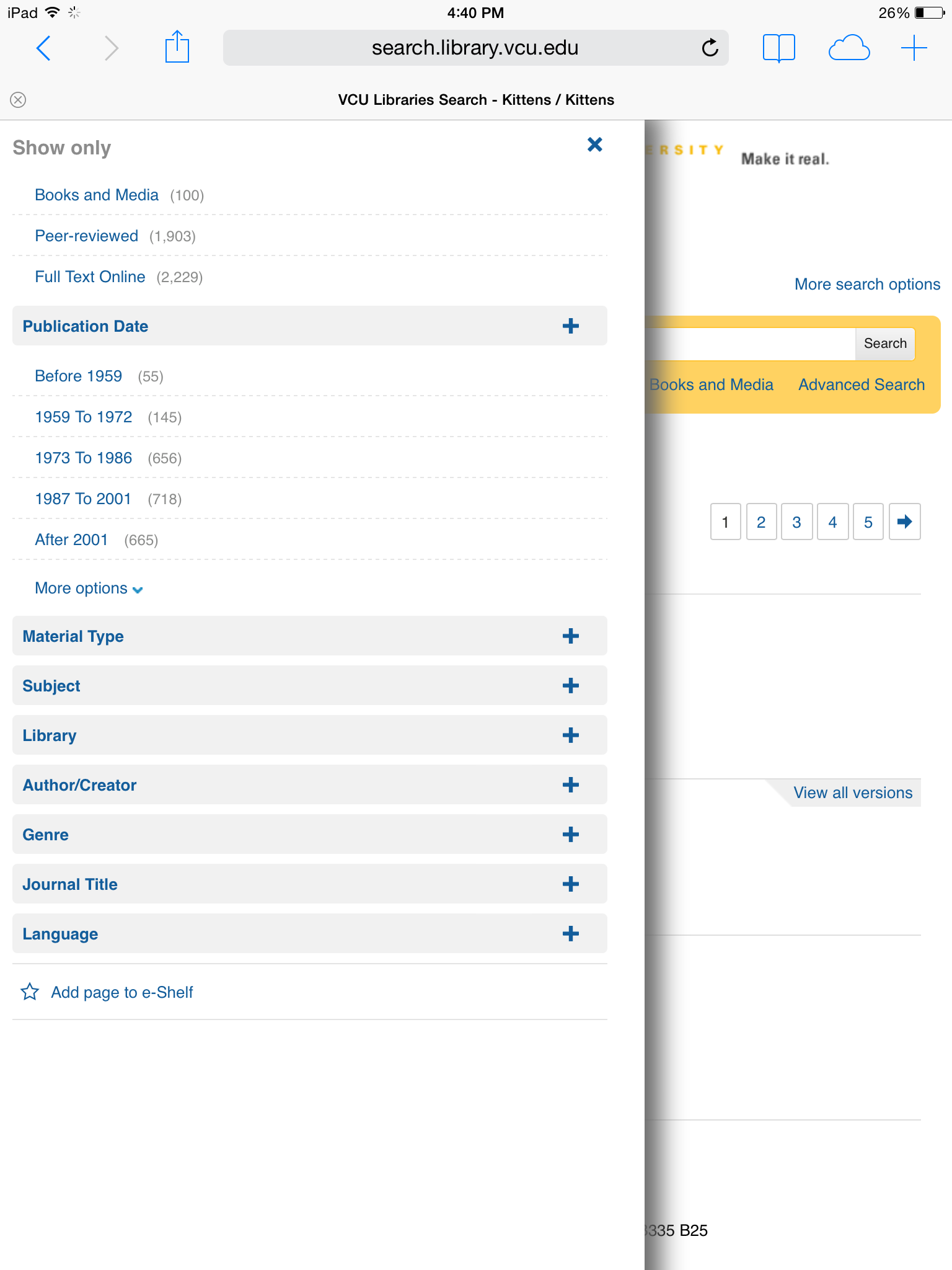
<p>On the tablet view, facets are hidden and slide out into view when the “filter options” link is selected. We chose the “filter” wording based on language we saw on a few mobile-enabled shopping websites, particularly Target and Amazon. Links to more search options (new search, databases, citation linker) are collapsed into a dropdown menu. Advanced options are there, just another click away. Because the date slider does not work on touch devices, we’ve hidden it and replaced it with a text list.</p>

<p><a href="/assets//2013-2024//2014/07/tablet.png"><img src="/assets//2013-2024//2014/07/tablet-225x300.png" alt="tablet" /></a> <a href="/assets//2013-2024//2014/07/tablet-search-options.png"><img src="/assets//2013-2024//2014/07/tablet-search-options-225x300.png" alt="tablet-search-options" /></a> <a href="/assets//2013-2024//2014/07/tablet-filter.png"><img src="/assets//2013-2024//2014/07/tablet-filter-225x300.png" alt="tablet-filter" /></a></p>

<h3 id="handheld">Handheld</h3>

<p><img src="/assets//2013-2024//2014/07/handheld-169x300.png" alt="handheld" />For the handheld view, we removed the advanced search and citation linker options entirely. I’d like to bring them back when their layout is better optimized for smaller screens. The link to filter results is prominent, and the juicier pagination links are especially helpful on the smaller screen. Our institutional branding is still there but centered and ensmallened.</p>

<h2 id="next-steps">Next steps</h2>

<p>We’re only in the first week of this new interface but already feel that it’s a vast improvement over the previous design. In the next few months we’ll solidify our development/deployment process and refine, refine, refine. I’d like to do some usability assessments of the interface as well.</p>

<h2 id="credits">Credits</h2>

<p>This was truly a collaborative effort between our web team and enterprise systems team. Web designer Alison Tinker worked closely with systems librarian Emily Owens to get the technical details just right. Tom McNulty and I helped frame the project and consult on design questions. And many librarians across the organization gave helpful feedback in our demo session and on our blog posts (many people saying “you should hide more stuff”, which I deeply appreciate).</p>

<h2 id="code">Code</h2>

<p>For our own sanity and maintainability’s sake, no JSP files were harmed in the making of this redesign. The CSS and Javascript <a href="https://github.com/vculibraries/alma-primo-customizations">customizations for this redesign are up on GitHub</a>.</p>]]></content><author><name>erinrwhite</name></author><category term="libraries" /><category term="ux" /><category term="ia" /><summary type="html"><![CDATA[This week we launched a new design for VCU Libraries Search (our instance of Ex Libris’ Primo discovery system). The guiding design principles behind this project:]]></summary></entry></feed>